
Installer
- Start the downloaded exe and, select the install location for the Lyric Video Studio and optionally, select if you want the installer to create shortcuts and click Install
- After install is completed, click Launch (or use the shortcuts or navigate to install folder and open LyricVideoStudio.exe)
- NOTE: When purchasing from itch.io, your download key is the license key. Paste it to application starting page to activate your license
- For linux installation tips, see Linux tips
Trial mode
You can use Lyric Video Studio in limited trial mode as long as you like, if you are individual or indie band! If you use Lyric Video Studio to make videos to others or you’re using it in commercial company, you need to purchase license. Licenses are purchased through itch.io.
NOTE: Existing Microsoft Store and Steam users: If you wish to change your product to this version, please use contact form and you’ll receive instructions of how to prove your purchase for a free license. Benefits of direct download is that you’ll receive updates faster! You can create videos for free with trial version or LITE versions. Service providers changes not included
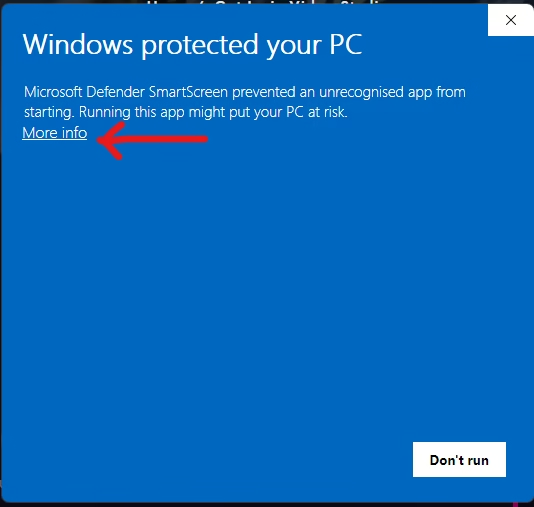
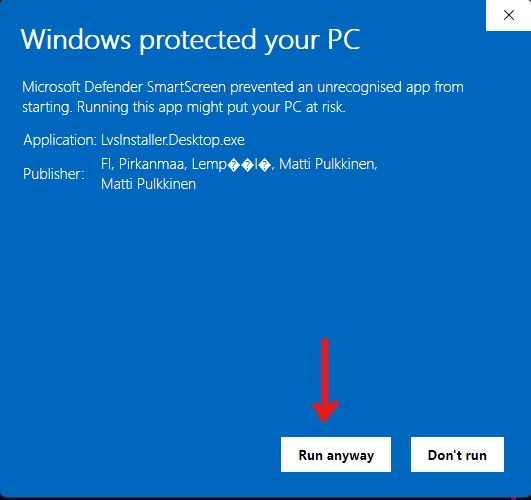
Windows Smart screen
NOTE X2: Due to recently received software certificate, Windows Smart Screen does not “trust” the the downloaded installer just yet, see the pictures below of how to start the installer