This is because Microsoft Store update certification can some times make up random excuses to block the update, only critical fixes and major updates are published there
And this is because Steam policies regarding external sources to pay something into
Want to upgrade your current version to internally distributed version, without delays to updates etc? Use contact and I’ll send you the instructions
I’m using Microsoft Store version and seeing posts about updates, but not getting update button?
Sometimes Microsoft store services do not work as indented. In that case, open Microsoft Store app (you can use search), Click Downloads from button left and click “Check for updates”
Microsoft store LITE-version only: how do I cancel my subscription?
Click “Subscriptions” and “Manage” on the subscription you wish to change
On the next page, you can modify the subscription
Why is my local image generation so slow?
Are you using CPU? Well, then, it is very slow at the moment. You should probable be using Black Forest Labs or Luma AI image plugins, price per image is real cheap
Make sure your memory usage does not go to “Shared memory”-zone, that will slow things up! (the red circles in the picture below is indicator that you don’t have enough GPU memory)
All locally runnign models have been tested and default setting optimized with NVIDIA GeForce RTX 4070 Ti SUPER (16gb vram). You may need to for example reduce generated image size for lower end GPU’s
How about other platforms than Windows?
Mobile: not planned at the moment, main issue would be screen size and available computing power
Linux & Mac: Yes, someday. Work for Linux support (Steam) is progressing slowly (if you would like to volunteer for beta testing, use contacts page)
Web: Currently not planned, access to computer resources is vital to the app right now. With web assembly, that’s achievable, but more complex.
Plugins use access tokens / api keys, is it safe?
Plugins store the keys to windows credential manager, in your computer
None of your access tokens / keys are logged in plain text, nor forwarded to any server (except of course when authenticating to service provider)
Usually service providers either offer pay-as-you-go, where you need to buy the credits beforehand
Some service providers even offer extra protection, allowing spending limits per
I’m experiencing random crashes / warning about file not saved?
Microsoft Defender and/or Drive can cause issues of project file is saved in Documents / Desktop etc cloud synced drive
Software performance also is affected by this, therefor it’s recommended to save project files to separate, high performing disk or to create project folder, like “c:\LvsProjects”. You should manually backup then to cloud, if needed. Automatic syncing might cause issues.
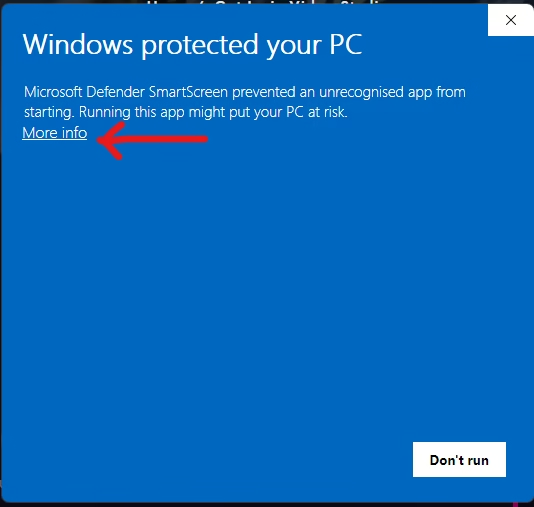
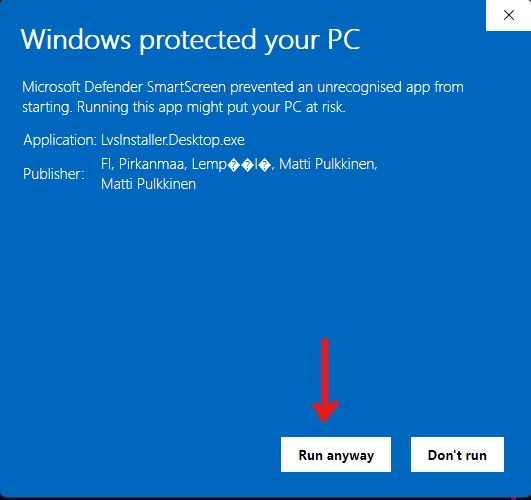
I’m getting Smart screen warning from installer
Installer and software has recently been signed with “personal” certificate. It takes time until the Windows will start trusting it, so please keep pressing “Install anyways” (does not apply to Microsoft Store / Steam versions)
Why does windows warns me when I download and try to start the installer?
Installer and application are signed with so called IV certificate, intented for individuals. Certificate works in a way, that when enough people have started it, Windows Smart Screen will no longer show the warning. You can see the developer name in the Smart Screen. Certificate is meant for extra security against anyone impersonating LVS or the Installer and tricking users to start malicious apps
I’m getting error about Milkdrop Presets load failure
Not all MilkDrop presets are compatible with the system. However, you can check at least one thing from the preset file itself: